🐞 Linkedin #tag glitch
We’ve fixed an issue where extra text would appear in snippets created from LinkedIn posts with hashtags. Now, your saved snippets will display the original content correctly. 🙌
New features, improvements and fixes in Cluing. Page 13 of 24.
We’ve fixed an issue where extra text would appear in snippets created from LinkedIn posts with hashtags. Now, your saved snippets will display the original content correctly. 🙌
There was a bug that was confusing for commenters when using non-existent tags. We fixed it, and now, if you try to use a tag that doesn’t exist, you’ll get a clear message ‘No tags found’. 🙌
We’ve fixed a bug that was causing the current topic to remain open when switching workspaces if the mention menu was active. Your workspace transitions should now be as smooth as before. 😁
We’ve fixed a bug that was causing the footer on your sharing topic page to scroll. It should be now fixed to the bottom of the page. 🥳 😁
We’ve fixed an issue that was causing our title suggestion to include unnecessary content from Twitter posts. Now, title suggestions will accurately reflect the author of the post. 🙌
There was a bug causing your snippets to hide their content after adding a title. We’ve fixed it and now all your snippets will be fully visible! 👁️
Discovered something amazing online? Now you can save the whole page as a snippet and do your research later. 🙌
All you have to do is press the dedicated button on our extension. 😁
Now you can style text as a code within the comment itself. 😍
We’ve improved our onboarding guide to help you get started even faster. ⚡ With clearer steps and explanations, you’ll be a pro in no time! 💪
There was a bug that prevented image content from expanding correctly within topic cards. This is now fixed, and you should be able to view full-sized images without any problems. 🙌
Sometimes, tooltips didn’t behave as expected. We’ve fixed the bug that was causing them to show up incorrectly. 🙌 You should now be able to see all the information you need. 🌱
We’ve made saving snippets super easy! 👀
With the new highlighter, you can save snippets without even opening the extension. Just highlight the text, and use the shortcut button to open a popup. From there, you can quickly decide where to save it.
It’s fast, simple, and will save you time! 🕜
Want to keep your research private within the Team version?
Well, now you can! 🥳
With private clusters, you can control who sees your research. Create secure spaces to collaborate on sensitive projects with only chosen members of your team. 🔒
Ever needed to duplicate your research? 🤔
Now you can easily copy entire topics to another cluster or even a different workspace. This makes it simple to reuse your research for new projects or share it with different teams. ✨
We’ve optimized our locate on Reddit snippets. Now it will load results quicker than ever before. No more waiting around – enjoy! ✨
There was an issue where pressing the Shift key while typing in comments or title, unintentionally activated card selection. That is now fixed 🙌
You can now easily mention people even if they don’t have a Collabwriting account. 🤔 Simply type @email@sample.com right in your comments and choose the role you want to assign to them. This will send them an email with instructions to register, making it easy to keep your team in the loop. 🙌
We just made your life easier. 🙌 We created a search bar for Extension, so now you can search all your Topics there as well. No more endless scrolling, just type what you’re looking for and get there in a flash. ⚡
Good news for all our keyboard lovers. We’ve added a brand new keyboard shortcut that lets you save snippets with a keyboard shortcut. ⌨️
Just highlight the text you want to capture and hit the secret combination - CTRL + ⇧ + S, or for Mac lovers ⌘ + ⇧ + S
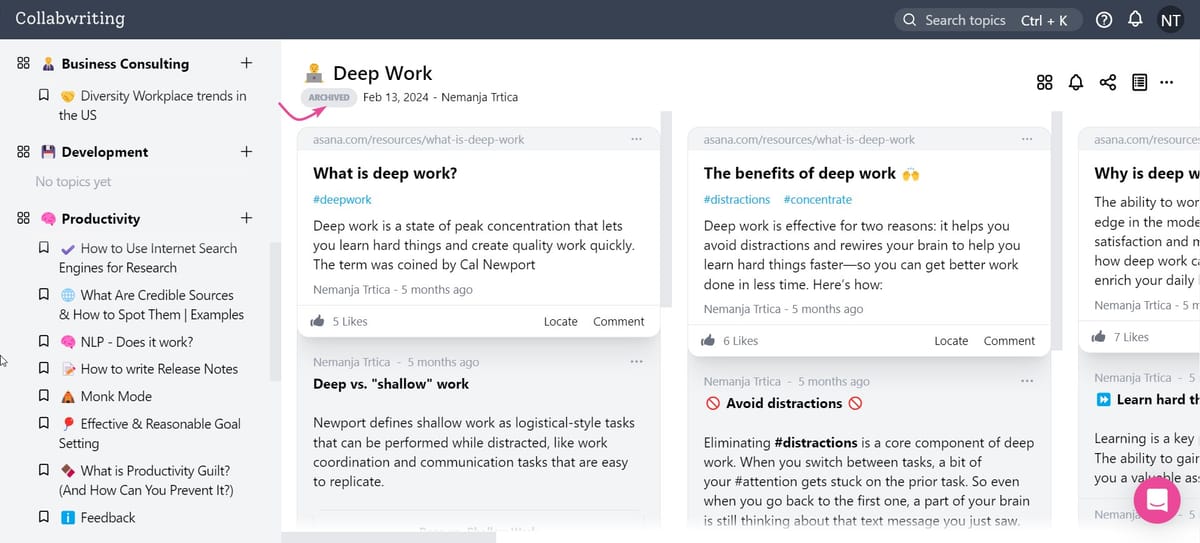
Keeping track of all your Archived Topics just got easier. 🙌 We’ve added the label to all archived Topics, making it a easier to understand weather Topic is archived or not. 🔖