

⚙️ Better support for Mobile Screens
We’ve given our Mobile View a friendly makeover, optimizing the screen sizing and layout to make things much more smoother.
Just waiting for you to try it out! ✨
New features, improvements and fixes in Cluing. Page 16 of 24.
We’ve given our Mobile View a friendly makeover, optimizing the screen sizing and layout to make things much more smoother.
Just waiting for you to try it out! ✨
We’ve just improved and done a pretty minor facelift to the Save Button on Reddit, LinkedIn, Twitter, and Quora. Now, when you hover over it, it lights up with new vibrancy. Enjoy the brighter experience! 🌈
You may have noticed that the Quick-Save button wasn’t showing on Quora search results. No worries the problem is now fixed. 😎
We recently encountered a multiple glitches with the Snippets Interface on our Extension. As always, we’ve fixed it and everything is looking shipshape again. 🚀🌟
When deleting a Topic, the Delete Confirmation Modal stubbornly refused to close. 🫤 Well, not anymore! We’ve fixed that sneaky bug, and now everything works just as it should. 🙌
We had that little bug where images weren’t fully visible in the comment section. Depending on their size, only a part of them would show up. We’ve fixed it and now you’ll see the whole picture! 🙌 🖼️
Ever spotted those weird scrollbars standing next to Titles for no good reason? We’ve fixed it up! So no more odd-looking scrollbars messing with your titles. 💫
When you open the app, you’re usually eager to revisit your previous research. Well, you will be happy to hear that we created dedicated space just for that. So say hello to the brand new Home Page!!! 🏠
Upon logging in, you’ll find “Your Recent Topics” and “Examples & Community Topics” waiting for you. These community topics include inspiring examples and contributions from our Team, providing insights and ideas for your own research. ✨
Remember how you had only one view option for your snippets? 🤔
Well, we’ve been cooking up something special behind the scenes - brand new Grid View! 😄
With this, you’ve got a whole new way to organize and visualize your snippets. No more long scrolling to see all of your snippets 🙌
Like on LinkedIn, Twitter and Reddit previously, you can now save Quora post in a single click 😄
Now, in your settings, you’ll find a brand new option called “Add cards to the bottom” 🔧
Flip the switch, and your new snippets will find their way to the bottom of your chosen topic. 😎
Ever got frustrated with the inability to undo the topic creation process? Now we gave you the power to stop it for whatever the reason. 😄
So say goodbay deletion of undesired Topics 🎉
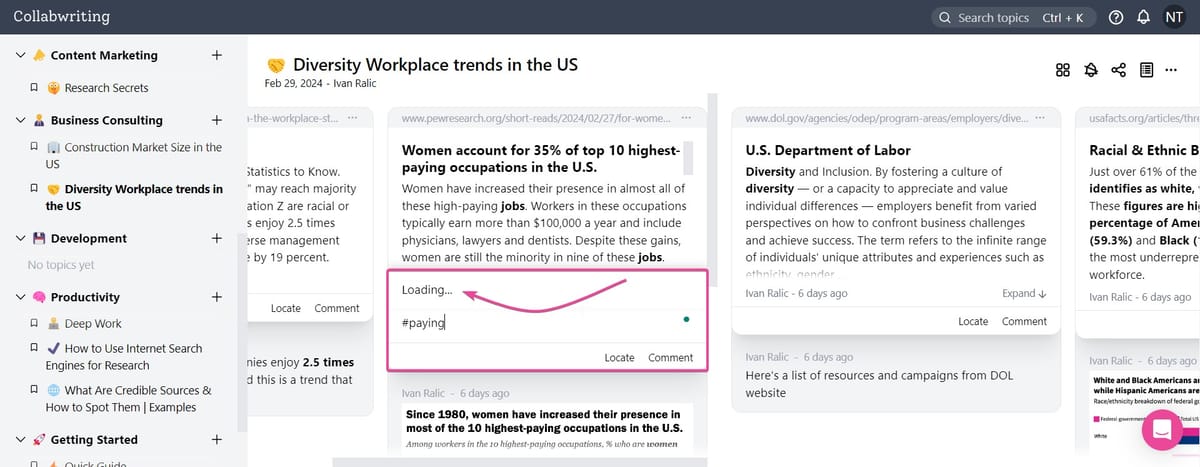
Ever experienced that odd moment when typing #tags in comments and seeing whitespace above? 🤔 Not anymore! We’ve added a loading bar to keep you in the loop and ensure you understand what’s happening. 😎
You can now minimize your Clusters on the Extension. 🙌 This means you can tidy up your workspace and focus on what matters the most. Enjoy!😸✨
We had that awkward moment with our Extension where it insisted on creating a new Cluster, with the exact same name, every time you tried to add a new Topic inside one. Well, good news – it’s fixed now! 🙌
We discovered a sneaky little bug that made it seem like commenters could rearrange snippet order on your topic. That is now impossible, everything stays in place as it should. ✨😎
Our extension went a bit wild on certain websites - hiding the logo and scroll bar. Now, problem is fixed, so dive in and enjoy using it just like before. 😎
Our Extension login icons lost their shine colors and went a bit dull on certain websites. As always, we fixed it and your icons are back to being bright and beautiful.🎨✨
We noticed a sneaky bug in the navigation panel where Dragging and Dropping a Topic into the search field allowed it to land there, which would ultimately cause the entire app to crash.
We’ve sorted it out and your navigation is smoother than ever! ✨
There was a bug on the Extension that allowed you to delete a Topic Title, and create a Topic without it.
We fixed it and now hitting enter generates an “Untitled” topic as expected. 😎