

🎉 Highlight Colors on Webpages
You can now change the color of your highlights on any webpage. This lets you organize your thoughts visually, making it even easier to categorize and understand your research. Enjoy! 😁
New features, improvements and fixes in Cluing. Page 9 of 24.
You can now change the color of your highlights on any webpage. This lets you organize your thoughts visually, making it even easier to categorize and understand your research. Enjoy! 😁
Have you ever been worried about losing your highlighted snippets if a webpage disappears or changes? 🤔
Worry no more! With our new Collabwriting Reader, you can now open and highlight the entire page content directly within Collabwriting. This means all your snippets will always be locatable and safe, even if the original page vanishes. 🙌
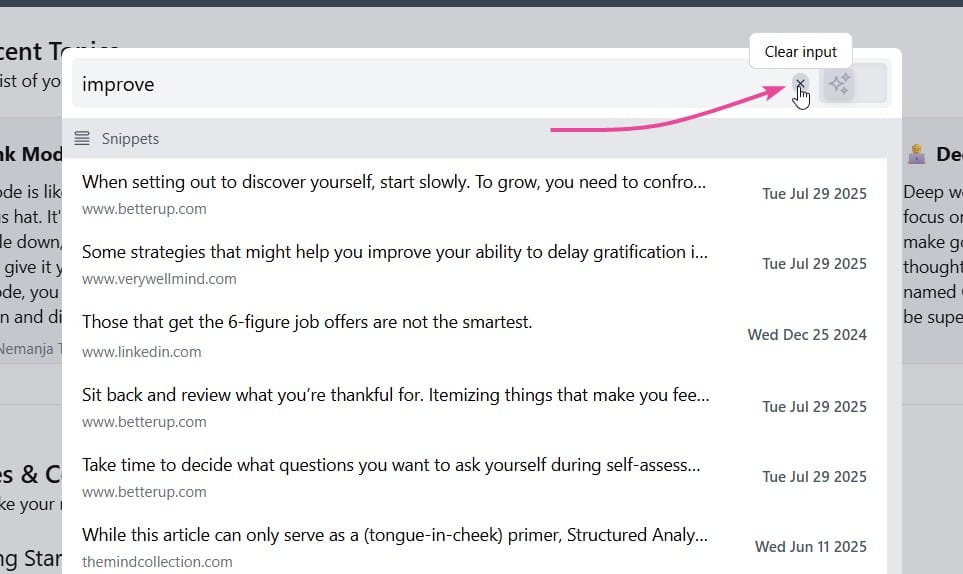
We’ve added a ‘clear button’ to the search bar. Now you can wipe out your search in one quick click and start fresh! Enjoj 🙌
We’ve fixed a bug that prevent tags to be copied with rest of the snippet content. Now, when you copy a snippet into some text editor app, its tags will stick with it, just like they should. 🏷️
There was a bug where clicking to save a “Most Highlighted” snippet sometimes didn’t work. We fixed it and now when you click to save those key insights, they’ll save every time. 🙌
Workspace Clusters didn’t stay at the top of the side menu. 😬 We fixed it and now it should be super easy to quickly see which cluster your topics belong to, helping you navigate your projects more smoothly. 🙌
Ever wish you could keep your finished snippets without cluttering your workspace? 🤔
Now you can mark snippets as “Done”. That means, instead of deleting your finished work, you can now move it to a completely new section “Completed”. It’s a great way to keep your active projects tidy while preserving all your research. ✨
Our Highlighter is smarter than ever before. Now, when you’re highlighting, you’ll see AI-powered suggestions for your Topic, Title, and Tags, all based on your past research. It’s like having a little assistant categorize things for you instantly! ✨
Good news for reading on the go! We’ve made some upgrades to how PDFs look on your mobile device. Now, viewing PDFs in Collabwriting should be much smoother and easier to read on your phone or tablet. 📱📄
We’ve enhanced team permissions to give you more control. 💪 Now, team members can manage Workspace Clusters and Topics. This means it’s easier for your team to organize and structure your collaborative content, ensuring everyone can contribute effectively to your shared knowledge. 📚
We’ve improved Bookmarks descriptions, making them clearer and more precise. Now, any missing text has been added, helping you get a more accurate understanding of your saved content. 😁
Want to quickly spot what’s important on a page? 🔍 We developed a feature that shows you the ‘Most Highlighted’ sections from other people, so you get a quick overview of the key content.
We’ve added an easy new way to save stuff directly to your topics! Now, you can add a link to any page right from your topic, instantly creating a handy bookmark for later. 😎
Now, you’ll always know if the page you’re on has already been bookmarked to your current topic.
There’s a new ‘Focus Bookmark’ preference that automatically highlights your bookmarked snippet whenever you open the extension on that topic. And if you prefer to do it manually, just click the bookmark button to instantly find that specific bookmark if exist.
Enjoy 🙌
We’ve given our search a little makeover! You’ll notice a smoother, more intuitive design and don’t worry, it still works its magic to show you improved AI search results, just with a much prettier face! 🦋
There was a bug where the color picker sometimes wouldn’t show up after you highlighted text on a PDF. Now, it’ll will always appear so you can easily pick the perfect highlight color. 🌈
We’ve fixed a bug where your last mention stick in comment when you type completely new one. Now, your comment section will be clear every time you go to type! 💬
Finding what you need in your PDFs just got a lot easier! You can now search directly within PDF documents you’ve uploaded to Collabwriting, making it much easier to find exactly what you’re looking for and save it as a note. 😁
There’s a brand-new section that gives you more control over your documents! You can:
Stay organized! 📚
Adding content to your topics is now super easy. There’s a new button that lets you instantly add PDFs, import Kindle notes or search the web (no need for Google anymore). 😁