Capture Content from Social Media on Desktop
Save LinkedIn Posts as Snippets
Section titled “Save LinkedIn Posts as Snippets”-
Open the Extension
Section titled “Open the Extension”
To save posts from LinkedIn, all you have to do is go to the LinkedIn app and open the extension in your browser.
-
Navigate to the Save Button
Section titled “Navigate to the Save Button”
You’ll find a “Save” button located beneath each post in your LinkedIn feed.
Clicking this button automatically captures the post’s description and stores it as a snippet within the extension, making it easy to revisit later.
Save Reddit Posts and Comments as Snippets
Section titled “Save Reddit Posts and Comments as Snippets”-
Open the Extension
Section titled “Open the Extension”
To save posts from Reddit, all you have to do is go to Reddit and open the extension in your browser.
-
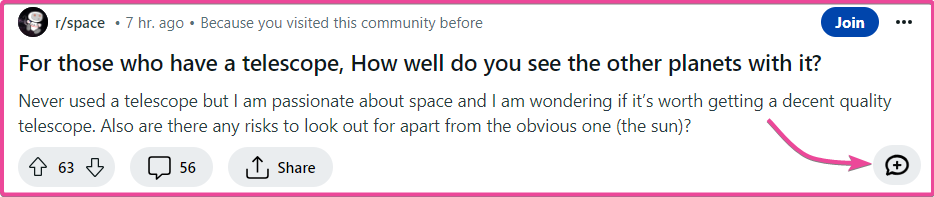
Navigate to the Save Button
Section titled “Navigate to the Save Button”
You’ll find a “Save” button located beneath each post on your Reddit home page. Clicking this button automatically captures the post’s description and stores it as a snippet within the extension, making it easy to revisit later.
-
Save Comment from Reddit
Section titled “Save Comment from Reddit”
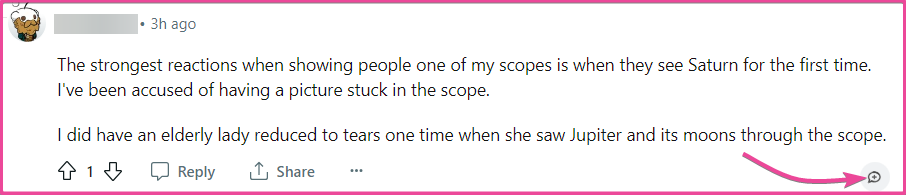
You can also find a “Save” button located next to each comment on Reddit posts.
Clicking this button automatically captures the comment and stores it as a snippet within the extension, making it easy to revisit later.
Save X/Twitter Posts as Snippets
Section titled “Save X/Twitter Posts as Snippets”-
Open the Extension
Section titled “Open the Extension”
To save posts from Twitter, all you have to do is go to the Twitter app and open the extension in your browser.
-
Navigate to the Save Button
Section titled “Navigate to the Save Button”
You’ll find a “Save” button located beneath each post on your Twitter home page. Clicking this button automatically captures the post’s description and stores it as a snippet within the extension, making it easy to revisit later.
Save Quora Posts as Snippets
Section titled “Save Quora Posts as Snippets”-
Open the Extension
Section titled “Open the Extension”
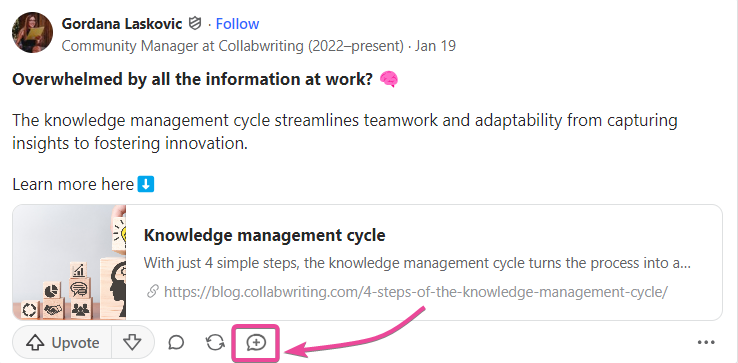
To save posts from Quora, all you have to do is go to Quora and open the extension in your browser.
-
Navigate to the Save Button
Section titled “Navigate to the Save Button”
You’ll find a “Save” button located beneath each post on your Quora home page. Clicking this button automatically captures the post’s description and stores it as a snippet within the application, allowing you to easily revisit it later.