

Snippet Authors
The Author field allows you to easily track the individuals who are the source or key reference for your snippet’s information. This will ensure you never lose context or forget a critical source.
How to Add Author
Section titled “How to Add Author”-
Open Author Field from Idea snippet menu
-
Start Typing name of person you want to name as Author
- The system will display suggestions integrated from X and LinkedIn to help you quickly identify the correct person
-
Select the Author
Recent Authors
Section titled “Recent Authors”Instead of having to search from scratch every time you want to credit someone, your most recent Authors are listed for instant selection. All you have to do is open the Authors field, and your Recent Authors list will be displayed automatically.
Removing Author
Section titled “Removing Author”-
Open Snippet menu
-
Click Edit Author
-
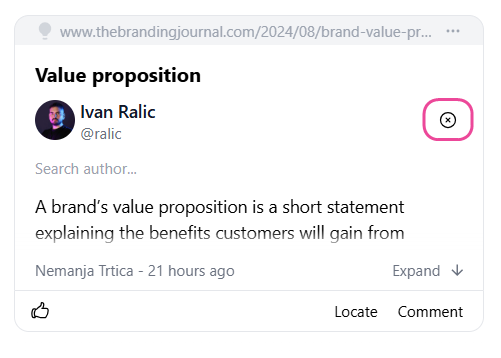
You’ll see a small “x” next to the author’s name
-
Click on it
That’s it! You’ve successfully removed the author from your snippet.
Social Media Snippets
Section titled “Social Media Snippets”When you save content directly from X (Twitter) or LinkedIn, the system automatically identifies the author for you. To keep your records accurate, these automatic authors cannot be removed or changed.