

Save X/Twitter Posts as Snippets
Open the Extension
- To save posts from Twitter, all you have to do is go to the Twitter app and open the extension in your browser.
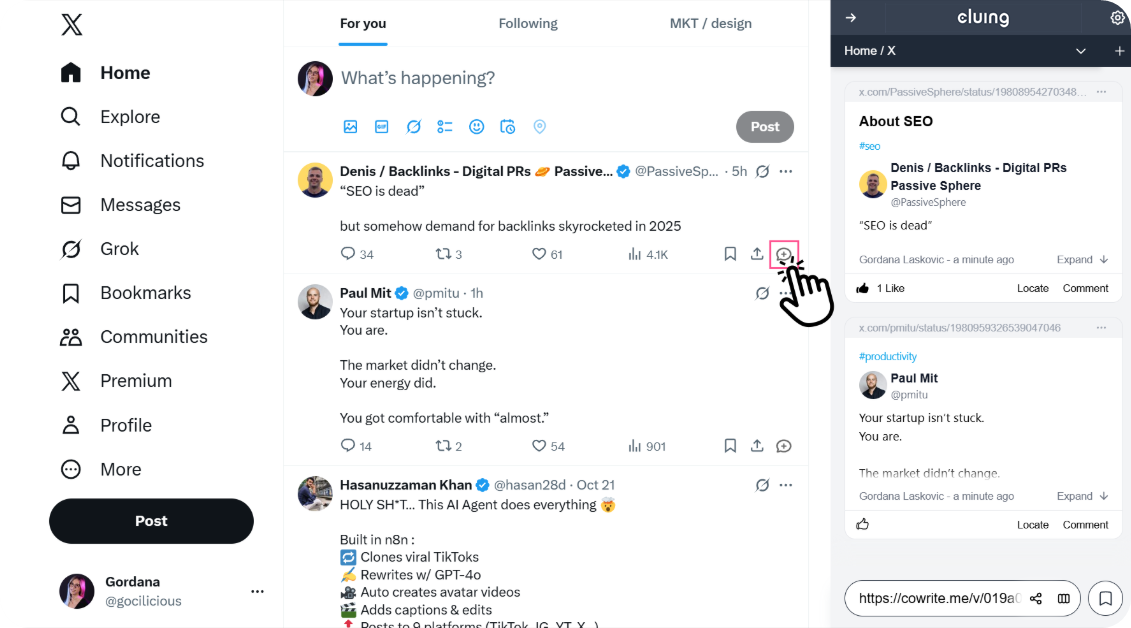
Navigate to the Save Button
-
You’ll find a “Save” button located beneath each post on your Twitter home page.
-
Clicking this button automatically captures the post’s description and stores it as a snippet within the extension, making it easy to revisit later.
How to save an X post or news from your phone to Cluing
Section titled “How to save an X post or news from your phone to Cluing”First, install the Cluing mobile app - available for both iOS and Android.
-
Find the X post or news/article you want to save.
-
Tap the Share button.
-
Select Cluing from the share options.
-
Choose the Topic where you want to save it.
-
Tap Create.
That’s it - quick and simple.
Your saved content is always easy to find in your workspace, and even if the original creator deletes it, your copy stays safely stored in Cluing.