How to Share a Topic on Mobile
Before you start download the Cluing app - available for iOS and Android.
How to Open Share Settings on Mobile
Section titled “How to Open Share Settings on Mobile”-
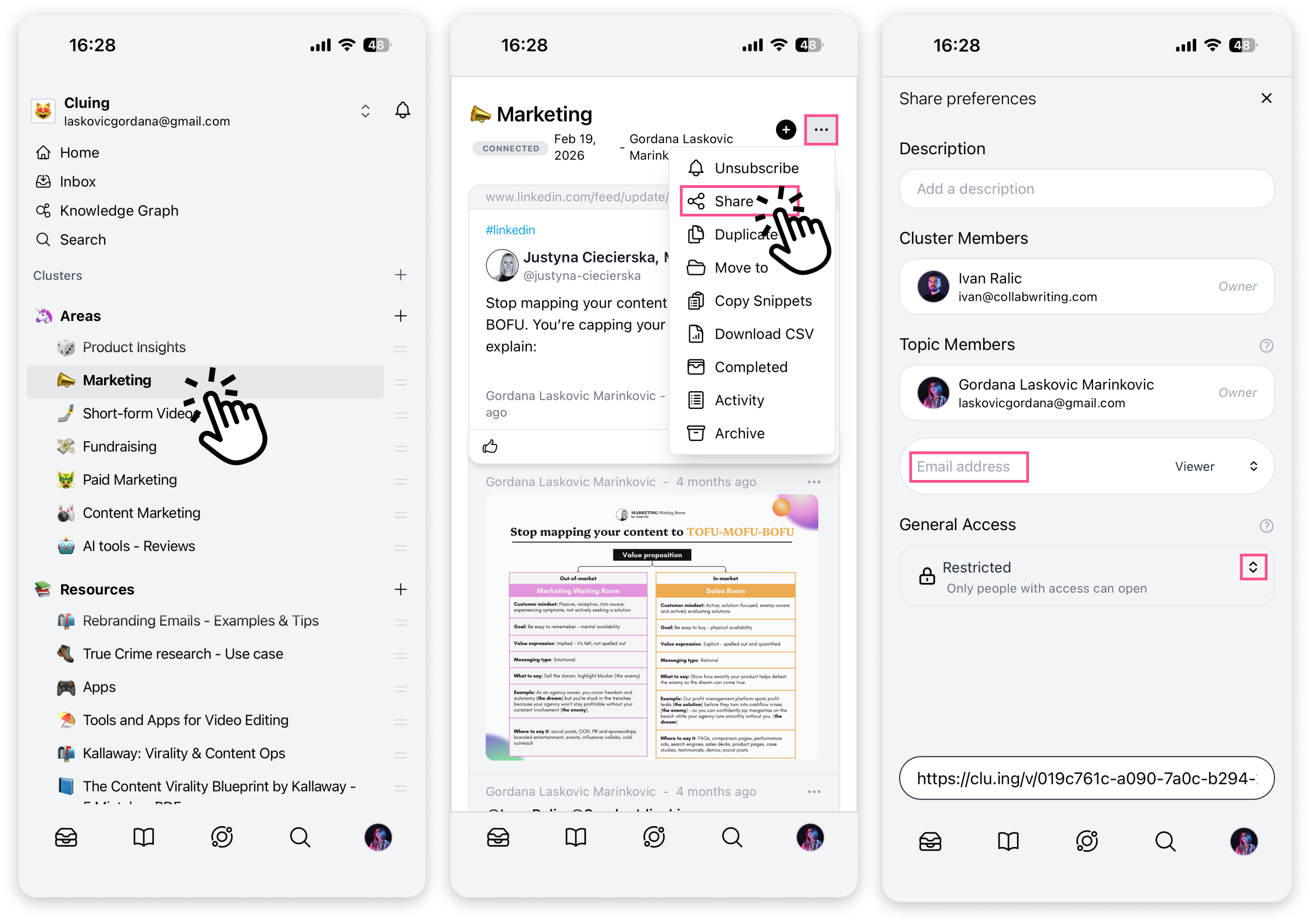
Open the Cluing app and navigate to the Topic you want to share
-
Tap the three dots in the top right corner
-
Select Share
Here you’ll see an overview of who’s already involved in the Topic - the Cluster member, Topic owner, and any existing Topic members.
How to Share a Topic
Section titled “How to Share a Topic”You can share a Topic in two ways:
Via Email
Section titled “Via Email”Type in the email address of the person you want to invite and assign them a role - Viewer, Commenter, or Editor.
-
If the person already has a Cluing account, the Topic will appear in their “Shared with Me” Cluster
-
If they don’t have an account yet, they’ll receive an email invite to join
Via clu.ing Link
Section titled “Via clu.ing Link”Generate a clu.ing link and share it anywhere. You can assign a role to the link as well - Viewer, Commenter, or Editor - so everyone who opens it gets the right level of access.